Technical SEO Audit Checklist: What to Check
Use this technical SEO audit checklist to fix crawlability, Core Web Vitals, structured data, and mobile issues that hurt your Google and AI search rankings.

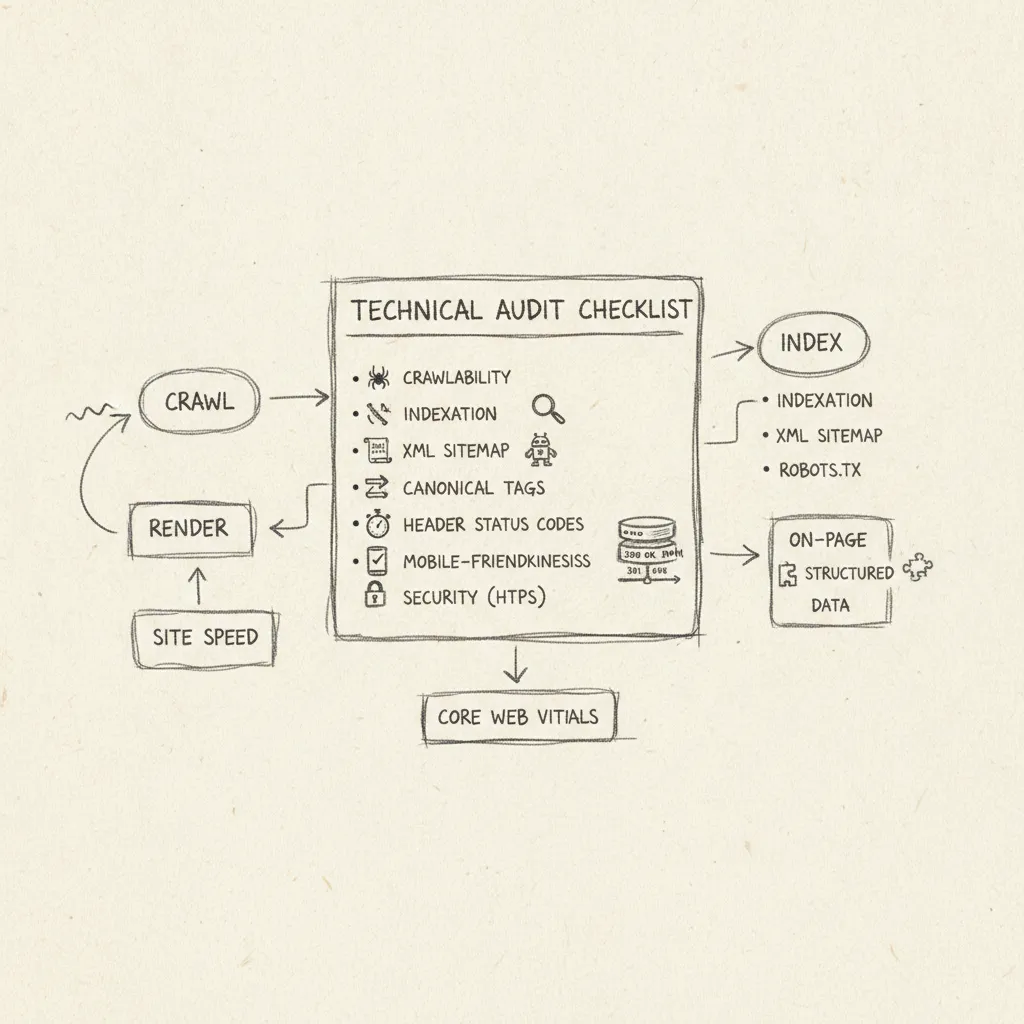
A technical SEO audit checklist covers six core areas: crawlability and indexing, canonical tags and metadata, Core Web Vitals and page speed, mobile performance, structured data, and internal linking. Run a full audit every six months, or immediately after a major site change or traffic drop. Fixing the issues it surfaces directly improves how Google crawls your site and how AI engines like ChatGPT and Perplexity discover and recommend your content.
Your Complete Technical SEO Audit Checklist: What to Check and Why
A technical SEO audit checklist covers seven distinct areas, each one a potential source of lost rankings, missed crawls, or invisible content.
Work through them in order: crawlability and indexing, canonical tags, metadata, structured data, Core Web Vitals, mobile performance, and internal linking. Skipping any one area leaves a gap that compounds the others.
"Technical SEO is the foundation of everything else you do in search. If crawlers can't access your content, no amount of great writing or link building will save your rankings." — John Mueller, Search Advocate at Google
How to identify and fix crawler issues and indexing problems
Start by validating your robots.txt file and XML sitemap. Blocked resources and missing sitemap entries are the fastest way to lose crawl coverage on large sites [2], a single disallow rule that accidentally blocks CSS or JavaScript can prevent Google from rendering pages correctly.
- Fetch your robots.txt at
yourdomain.com/robots.txtand confirm no critical directories or assets are blocked. - Submit your XML sitemap in Google Search Console and check the "Coverage" report for excluded or errored URLs.
- Run a site crawl (Google Search Console's URL Inspection tool works for spot checks; a dedicated crawler handles site-wide analysis) to surface 4xx errors, redirect chains, and orphaned pages.
- Check your
llms.txtfile, an emerging 2025 standard that tells AI engines like ChatGPT and Perplexity which content to index and cite. Forward-looking audits should treat this as a required item, not optional.
According to Google's official crawling and indexing documentation, ensuring your robots.txt and sitemap are correctly configured is the single most important step in making your content discoverable by Googlebot.
What to check for canonical tags, metadata, and structured data
Canonical tag errors, missing, self-referencing, or conflicting canonicals, are among the most common causes of duplicate-content indexing problems [1]. Every indexable page needs a canonical tag pointing to the correct URL; pages without one leave Google to guess.
- Confirm each page carries a self-referencing canonical unless it intentionally consolidates authority to another URL.
- Check title tags (50–60 characters) and meta descriptions (120–158 characters) for duplicates, truncation, and missing entries.
- Audit your structured data, schema markup, using Google's Rich Results Test. Schema markup now serves two purposes: it helps Google rank your pages and helps AI engines like ChatGPT and Perplexity extract and cite your content accurately. Tools like Moonrank automate this layer, implementing schema markup and structured data without requiring manual edits.
"Canonical tags are one of the most misunderstood elements in technical SEO. A single misconfigured canonical can silently drain authority from your most important pages for months before anyone notices." — Lily Ray, VP of SEO Strategy at Amsive
How Core Web Vitals and mobile performance fit into a technical audit
Google's 2025–2026 Core Web Vitals thresholds set clear pass/fail lines: LCP under 2.5 seconds, INP under 200 milliseconds, and CLS under 0.1.
- Run PageSpeed Insights on your five highest-traffic pages and record field data (real-user metrics), not just lab scores.
- Check Google Search Console's "Core Web Vitals" report for URLs flagged as "Poor", these receive a direct ranking penalty.
- Test mobile rendering with the Mobile-Friendly Test and confirm tap targets, font sizes, and viewport settings meet Google's mobile-first indexing requirements.
- Review internal linking: every important page should be reachable within three clicks from the homepage, with descriptive anchor text that signals topic relevance to both crawlers and AI retrieval systems.
According to the Web.dev Core Web Vitals guidance published by Google's developer team, pages that fail LCP or INP thresholds experience measurable drops in user engagement and search visibility compared to pages that pass all three metrics.
Choose the Right Technical SEO Audit Tools for Your Situation
No single tool covers every check on a technical SEO audit checklist, the strongest audits combine a crawler, a backlink tool, and Google's own data.
How Do Moz, Sitebulb, Semrush, and Other Tools Compare for Different Use Cases
Google Search Console is the non-negotiable starting point for any audit. It surfaces real crawl errors, Core Web Vitals field data, and manual actions that no paid crawler can replicate, and it costs nothing.
Screaming Frog is the standard choice for deep crawl analysis on mid-to-large sites. The free tier covers up to 500 URLs; the paid license runs £259/year for unlimited crawling. Sitebulb covers similar ground but adds visual crawl maps, which make presenting findings to clients considerably faster [2].
Semrush Site Audit and Moz Pro both run cloud-based crawls and surface prioritized issue lists. They suit teams that need scheduled, recurring audits without maintaining a desktop crawler, Semrush also doubles as a backlink analysis tool, which reduces the number of subscriptions you need.
What's Included in a Free SEO Audit Checklist Versus Paid Tools
Google Search Console, Screaming Frog's free tier, and PageSpeed Insights together cover roughly 80% of critical technical checks at zero cost. That combination handles crawlability, indexing, page speed, and Core Web Vitals.
Paid tools add scheduled monitoring, historical trend data, backlink analysis, and structured issue prioritization. A complete audit typically pairs a crawler, Screaming Frog or Sitebulb, with a backlink tool such as Ahrefs or Semrush, plus Google's own data on top.
Prioritize and Fix Technical SEO Issues by Impact and Effort
Fix high-impact, low-effort issues first, missing meta titles, broken canonical tags, blocked CSS in robots.txt, before committing dev time to structural rebuilds.
Which technical SEO problems to fix first based on impact and effort
A 2x2 impact-effort matrix cuts through the noise your technical SEO audit checklist surfaces. Plot every issue on two axes, how much it hurts rankings versus how long it takes to fix, then work the high-impact/low-effort quadrant before anything else.
Some issues should never wait regardless of effort. Pages returning 5xx server errors, noindex tags on revenue-generating pages, a missing XML sitemap, and Core Web Vitals failures on your top-traffic URLs all belong in a same-week fix queue. Each one directly blocks Google and AI search engines from crawling or trusting your site.
Schedule medium-priority items within 30 days:
- Duplicate H1 tags across product or category pages
- Missing structured data on key page types (product, FAQ, article)
- Images without alt text, a fast win for both accessibility and indexing
- Slow server response times where TTFB exceeds 600ms, which Google's own documentation flags as a threshold worth addressing
Deprioritize large-scale site architecture changes until the quick wins are shipped. A full navigation restructure can take months, broken canonicals can be fixed in an afternoon.
Track every issue in a shared Google Sheet with columns for: issue type, affected URLs, priority tier, assigned owner, and status. Without a shared tracker, fixes stall at the handoff between your SEO team and developers.
The Schema.org getting started guide provides authoritative documentation on implementing structured data correctly — a critical step in any technical SEO audit checklist that ensures your pages are eligible for rich results and AI engine citations.
Automation strategies and scripts that simplify your audit process
Manual re-audits every quarter let regressions compound for weeks. Three automation layers prevent that.
- Google Search Console API scripts: Pull crawl errors, coverage drops, and Core Web Vitals data on a weekly schedule. A basic Python script using the GSC API takes under two hours to set up and runs unattended.
- Screaming Frog scheduled crawls: Configure Screaming Frog to crawl your site automatically and export a delta report, new broken links, missing tags, or redirect chains added since the last crawl.
- Semrush automated site audit alerts: Set threshold-based alerts so you receive a notification when your site health score drops by more than a defined percentage, catching regressions before they affect rankings.
Moonrank's technical AI audit layer runs a parallel process, automatically implementing schema markup, structured data, and llms.txt configuration daily, so AI search engines like ChatGPT and Perplexity can parse your site without waiting on manual fix cycles.
"Automation is not a shortcut in technical SEO — it's a necessity. Sites that rely solely on manual audits will always be reacting to problems rather than preventing them." — Patrick Stox, Product Advisor at Ahrefs
Common Technical SEO Audit Mistakes to Avoid
Most technical SEO audit checklist errors waste time on low-impact fixes while critical issues go unresolved, here are the five most costly ones.
Crawling the desktop version while Google indexes mobile. Google has used mobile-first indexing since 2019, meaning it judges your site based on what Googlebot's mobile crawler sees. Always configure your crawl tool to use a mobile user-agent; a desktop crawl can miss missing viewport tags, blocked mobile resources, and content that only renders on desktop.
Treating every 404 as urgent. A 404 on a page with no inbound links and zero traffic is low priority. A 404 on a URL with backlinks or significant historical traffic is critical, it bleeds link equity and kills real user sessions. Sort crawl errors by inbound link count and traffic before triaging.
Fixing issues without re-crawling to verify. A canonical tag correction that accidentally introduces a redirect chain is worse than the original problem. Re-crawl the affected URLs after every change to confirm the fix resolved the issue cleanly.
Confusing PageSpeed lab scores with real-user data. PageSpeed Insights lab scores can show passing grades while Chrome User Experience Report (CrUX) field data reveals failing INP scores on actual mobile devices. Check both tabs in PageSpeed Insights before marking Core Web Vitals as resolved.
Skipping structured data validation. Invalid schema markup, even when the code is present, can actively suppress rich results. Run every schema implementation through Google's Rich Results Test before and after deployment to confirm eligibility, not just presence.
Measure the Impact of Your Technical SEO Audit Over Time
Set a 90-day measurement window after implementing fixes, Google typically needs 4–12 weeks to re-crawl, re-index, and reflect ranking changes.
Track four metrics in parallel: organic impressions and clicks in Google Search Console, crawl coverage (pages indexed vs. submitted in your sitemap), Core Web Vitals pass rates in the Chrome UX Report, and average position for your target URLs. These four signals together tell you whether your fixes landed or stalled.
What real-world results to expect after implementing a technical SEO audit
Sites that resolve critical crawl and indexing issues commonly see 15–30% increases in indexed pages within 60 days, a direct expansion of the URLs that can rank. That gain compounds: more indexed pages means more entry points for organic traffic, not just better rankings on pages you already had.
At the 90-day mark, run a follow-up mini-audit against your original technical SEO audit checklist. New deployments, feature releases, CMS updates, template changes, routinely introduce regressions. Technical SEO is a maintenance cycle, not a one-time project.
How AI indexing requirements affect your ongoing audit strategy
Structured data improvements and clean crawlability are the primary levers that increase how often AI engines cite your content. After each audit cycle, monitor how frequently your brand appears in ChatGPT, Perplexity, and Gemini responses, not just Google rankings.
Moonrank tracks this automatically, reporting your brand's mention frequency across ChatGPT, Gemini, Claude, and Perplexity so you can see whether technical fixes are translating into AI search recommendations, the metric that traditional rank trackers miss entirely.
Frequently Asked Questions
How often should you run a technical SEO audit?
Run a full technical SEO audit at least once per quarter, with lighter crawl-based checks monthly. Site migrations, major CMS updates, or a sudden drop in organic traffic each warrant an immediate audit outside the regular schedule. Larger e-commerce sites with thousands of SKUs, where new pages, redirects, and canonicalization issues accumulate fast, benefit from automated weekly crawls using a tool like Screaming Frog or Sitebulb to catch regressions before they compound.
Who should perform a technical SEO audit, an in-house team or an agency?
Either can do it well, but the right choice depends on your team's depth with crawl data, structured data, and Core Web Vitals analysis. In-house teams move faster and carry more site context; agencies bring pattern recognition across dozens of sites. For SMBs without a dedicated SEO hire, automated audit platforms close the gap, Moonrank, for example, runs continuous technical checks and fixes schema markup, structured data, and llms.txt configuration without requiring any technical input from the business owner.
How long does a technical SEO audit take to complete?
A focused technical audit of a small-to-medium site typically takes 4–16 hours, depending on site size and the depth of analysis. A 10-page brochure site can be reviewed in an afternoon; an e-commerce store with 50,000+ product URLs may require several days just to process crawl data, prioritize issues, and document fixes with clear ownership.
What is the difference between a technical SEO audit and a full SEO audit?
A technical SEO audit covers only the infrastructure layer, crawlability, indexation, site speed, structured data, and server configuration. A full SEO audit adds on-page content quality, keyword targeting, internal linking strategy, and backlink profile analysis [3]. Think of the technical audit as checking whether search engines can access and understand your site, and the full audit as checking whether your site deserves to rank once they can.
Can you perform a technical SEO audit without developer access?
Yes, many critical checks on a technical SEO audit checklist require no developer access at all. You can validate robots.txt, review canonical tags, test page speed, check mobile rendering, and audit structured data using free tools like Google Search Console, PageSpeed Insights, and the Rich Results Test. However, actually fixing issues such as server errors, redirect chains, or missing schema markup typically requires developer involvement or an automated platform that implements fixes directly.

Conclusion
A technical SEO audit is only useful if it ends with a prioritized fix list, not a spreadsheet that sits unopened. Start with crawlability and indexation, if search engines and AI engines cannot access your pages, nothing else matters. Then work through Core Web Vitals, structured data, and mobile usability in order of traffic impact.
As AI search engines like ChatGPT, Gemini, and Perplexity become primary discovery channels, technical signals such as schema markup, llms.txt, and structured citations carry more weight than they did two years ago. Your next concrete step: run a crawl of your site today using Screaming Frog's free tier (up to 500 URLs), export the issues list, and fix every 4xx error and missing canonical tag before touching anything else. If you want the technical layer handled automatically, Moonrank audits and optimizes those signals on autopilot for $99/month.
Sources & References
- The Technical SEO (& Beyond) Site Audit Checklist - Moz
- Technical SEO Audit Checklist & Template - Free to Use | Sitebulb
- Advanced SEO Audit Checklist For All Stages Of The Analysis
Recommended Articles
Explore more from our content library: